
David
While developing photo organization for MeCloud, we tested how to separate business cards, receipts, and other images. A shop card can look very much like a personal business card: both may contain a logo, text, and contact details. Visual similarity alone can put the wrong images in the same folder.
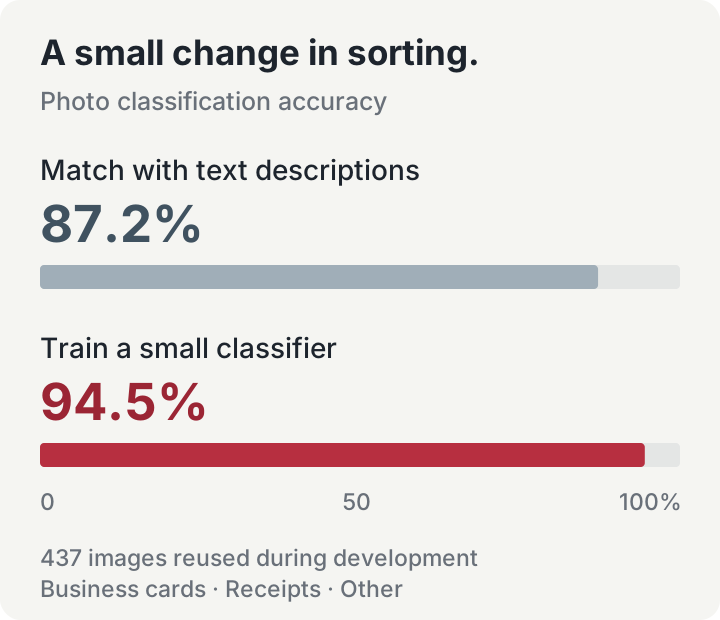
Our experiment keeps EmbeddingGemma 2 unchanged and trains a small classifier on the image features it produces. On a fixed set of 437 photos used during development, accuracy rose from 87.2% to 94.5%. Here is how the method works, what improved, and what we would work on next.
Separate reading the image from sorting it
EmbeddingGemma 2 turns each image into a list of 768 numbers, called a vector. These numbers represent features of the image in a form that another program can compare and process.
A small classifier then reads the vector and selects one of three labels: business card, receipt, or other. Only this final classifier is trained. The model that extracts the image features stays fixed.
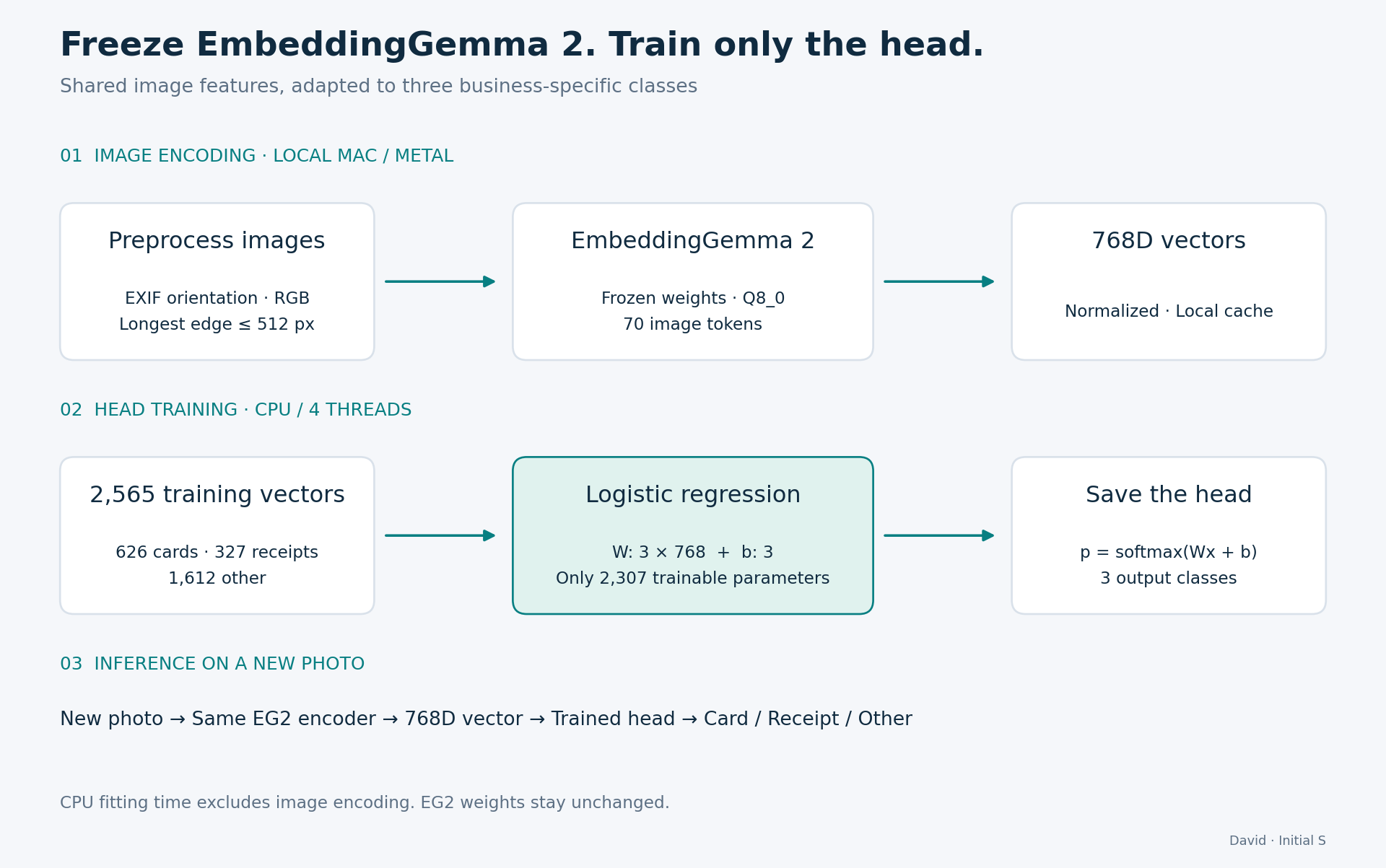
We use logistic regression, a simple classifier with 2,307 trainable parameters for the three outputs. The classification path does not add OCR or ask a generative model to describe every photo.
Before encoding, images are rotated according to their EXIF orientation, converted to RGB, and resized to a maximum long edge of 512 pixels. We use the GGUF version of EmbeddingGemma 2 with Q8_0 quantization, 70 image tokens, and 768-dimensional output. The Mac's Metal backend generates the vectors, which are saved locally for reuse.
This separation is useful when the sorting rules change. The same image features can be reused to train a new small classifier, without updating the encoder or generating all the vectors again.
Teach the category boundary with examples
The baseline needs no classifier training. It compares each photo with text descriptions such as “a personal business card” and “a shopping receipt.” We use 120 existing text anchors and select the class with the closest match.
That makes it easy to get started. But similarity does not always match the distinction a user wants. A card displaying a shop logo may belong in “other,” while a shop owner's card containing their name and personal contact details belongs in “business card.” Labeled examples teach the classifier this boundary.
The training set has 2,565 images: 626 business cards, 327 receipts, and 1,612 other images. It combines public datasets, print examples, synthetic images, rendered PDFs, and local photos. Labels were checked mainly by an AI assistant using both the images and their source context.
Business-card examples include many print portfolios and relatively few photos taken in everyday use. A clean image of a card on a bright surface differs from one photographed at an angle in poor light. Broader coverage of those situations is an important part of the next step.
What changed on the same 437 photos
The comparison set contains 91 business cards, 144 receipts, and 202 other images. Of these, 170 come from a local NAS and 267 are public samples. It is a fixed development set used for repeated evaluation. Both methods see the same images and assign every image to one of the three classes.
| Measure | Text-anchor matching | Trained classifier |
|---|---|---|
| Correctly classified images | 381 / 437 | 413 / 437 |
| Other images mistaken for cards or receipts | 39 | 8 |
| Genuine business cards found | 85 / 91 | 78 / 91 |
The trained classifier correctly sorts 32 more images. In particular, it reduces the number of unrelated images mixed into cards and receipts from 39 to 8.
At the same time, it finds fewer genuine business cards: 78 instead of 85. The boundary has become stricter. That removes confusing lookalikes but also excludes some real cards.
This tradeoff matters to the interface. An automatically created business-card folder benefits from fewer unrelated images. A search intended to find every possible card may benefit from showing a wider set of candidates. Accuracy helps measure the overall change, while the missed-card count helps decide how to use the classifier.
Receipts improve too: the share of genuine receipts found rises from 92.4% to 97.9%. Looking at the classes separately reveals which part still needs attention, even when the overall score improves.
The experiment also tests a fixed confidence threshold that lets the classifier leave some images undecided. With a threshold of 0.7, it produces 399 correct labels, 20 undecided images, and six false positives among “other.” Business-card recall falls to 78.0%. This gives another way to trade automatic coverage for fewer mistaken labels; the score is a classifier output, rather than a measured probability that a prediction is correct.
About 0.06 seconds to train from ready-made vectors
The experiment runs on a MacBook Air M3 with 24 GB of memory, using four CPU threads. Once the 2,565 image vectors are ready, fitting the classifier takes 0.057 seconds.
This is the training step in scikit-learn. X_train contains the 768-dimensional vectors, and y_train contains their class labels.
from sklearn.linear_model import LogisticRegression

head = LogisticRegression(
    C=100,
    class_weight="balanced",
    solver="lbfgs",
    max_iter=3000,
    random_state=20261015,
)
head.fit(X_train, y_train)
The balanced option gives more weight to classes with fewer training examples. We keep the configuration fixed for this comparison rather than searching for settings against the test results.
Scoring one ready-made vector takes about 0.006 milliseconds at the median. The measurement includes the class decision, and uses 2,000 calls after 100 warm-up calls.
These timings cover the classifier. Reading a new photo, resizing it, and generating its embedding take additional time. The small head is especially useful when an application already has image vectors for search: it can add sorting with little extra computation.
Better examples are the next priority
The experiment shows a practical role for a small classifier: teach an existing representation how to make the distinctions a particular task needs. Here, that helps keep shop cards and similar images out of the business-card group.
The next priority is more independent photos: different people, issuers, backgrounds, lighting, and camera angles. Ten versions of one card provide less variety than photos of ten people's cards taken in different situations. The difficult examples should include both confusing non-cards and genuine cards that are easy to miss.
The current 437-image set has been used throughout development. A fresh set of naturally photographed cards will help test whether we can retain the reduction in false positives while recovering the genuine cards that the classifier misses.